Download Speccy
Advanced system information & hardware monitoring for Windows

Speccy

Advanced system information and PC hardware monitoring for Windows

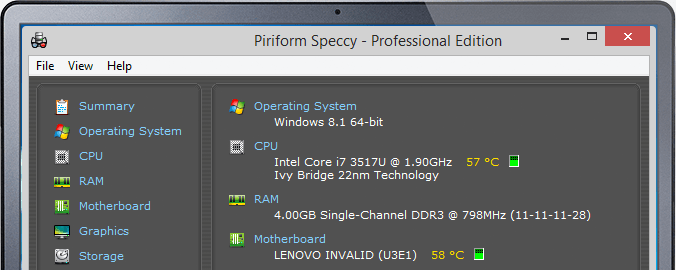
Speccy system information overview

Download

Latest Version

Free download · Fast installer · For Windows 10/11

Speccy is a fast, lightweight system information utility from the makers of CCleaner. It gives you a detailed snapshot of your PC hardware and operating system, including CPU, motherboard, RAM, graphics, storage devices, and installed OS. Monitor live temperatures and drive health so you can troubleshoot issues, plan upgrades, and keep your Windows PC running smoothly.

Features

Explore the powerful tools that make Speccy the ideal companion for diagnosing, monitoring, and upgrading your PC.

See inside your PC hardware
See inside your PC

Detailed hardware reporting

Detailed reporting

Problem solving with system information

Problem solving

Snapshots and shareable PC specs

Snapshots & sharing

Full System Overview:

  • Instant summary of key components including CPU, motherboard, RAM, graphics, storage, and OS.
  • See clock speeds, core counts, RAM type and capacity, graphics memory, and storage capacity in one clean dashboard.
  • Drill down into each device to view advanced details and manufacturer-specific information before you buy or upgrade parts.

Real-Time Temperature Monitoring:

  • Track live temperatures for CPU, GPU, motherboard, and storage devices to prevent overheating.
  • Watch temperature trends while gaming, encoding, or stress-testing to verify cooling performance.
  • Quickly identify components running hotter than expected so you can clean dust, improve airflow, or replace failing parts.

Storage Health & S.M.A.R.T. Data:

  • Read S.M.A.R.T. attributes from HDDs and SSDs to check for reallocated sectors, pending sectors, and other warning signs.
  • Monitor drive power-on hours, error rates, and wear indicators so you can replace disks before they fail.
  • Use Speccy as part of your backup and maintenance routine to protect important files from unexpected drive issues.

Snapshots & Exportable Reports:

  • Save complete system snapshots to compare configurations before and after hardware changes.
  • Export detailed reports as text or XML files for documentation, remote troubleshooting, or forum support.
  • Share exported specs with technicians, friends, or communities to get faster, more accurate help.

Technical registry and command examples

Windows stores much of its hardware and system configuration data in the registry. Administrators often review these locations when validating the information that tools like Speccy display.

Typical registry paths for hardware information

HKEY_LOCAL_MACHINE\HARDWARE\DESCRIPTION\System\CentralProcessor
HKEY_LOCAL_MACHINE\HARDWARE\DEVICEMAP\Scsi
HKEY_LOCAL_MACHINE\SYSTEM\CurrentControlSet\Enum\PCI
HKEY_LOCAL_MACHINE\SYSTEM\CurrentControlSet\Services\Disk
HKEY_LOCAL_MACHINE\SOFTWARE\Microsoft\Windows\CurrentVersion\Uninstall

Example commands to cross-check system information

wmic cpu get Name,NumberOfCores,NumberOfLogicalProcessors
wmic diskdrive get Model,Size,Status
wmic baseboard get Manufacturer,Product,SerialNumber
wmic PATH Win32_VideoController get Name,AdapterRAM
Get-CimInstance Win32_OperatingSystem | Select-Object Caption,Version,OSArchitecture

Use Speccy alongside these registry locations and command-line queries when documenting systems, preparing upgrade plans, or opening support tickets so that technicians can see exactly how your PC is configured.

Speccy screenshots

Click a thumbnail to enlarge, then use arrows to scroll left or right: